
MANAGED IT SERVICES
Your technology.
Our ongoing support.
Keep your business connected with LinkedUp Security. We manage existing IT infrastructure, plan and install new systems, and respond to alerts and issues remotely or on site across Westchester, Putnam, Dutchess, Orange and Rockland Counties.
A CLEAR SUPPORT PROCESS
Monitor. Investigate. Resolve.
Agreed systems send alerts to our team. We investigate the issue, work remotely when practical, and arrange an on-site visit when the problem requires hands-on attention.
Monitoring coverage, support hours and response expectations are defined in your service agreement.
From existing systems to a new setup.
Manage what you have
Get a clear view of your current network, systems and dependencies. We assess the equipment already in place, identify support needs and agree on the infrastructure we will manage.
Build what comes next
Opening a location or replacing aging equipment? We plan the infrastructure, install and configure the agreed systems, and document the setup so ongoing support starts with a clear understanding of your environment.
Respond when issues arise
We receive alerts for the systems included in your plan, investigate what is happening and work through the next steps. Remote troubleshooting and on-site assistance keep support connected to the actual problem.
Support built around your business.
Review your environment
We start with your locations, users, equipment and the business activities that depend on them. We review existing administration access and any current support arrangements.
Agree on the plan
We define the systems covered, alert handling, maintenance responsibilities, support hours and how requests reach us. Proposed changes and project work are scoped before they begin.
Manage and support
We configure the agreed monitoring, respond to issues and maintain useful system documentation. When equipment, users or locations change, we review what needs to change in the support plan.
Local support across the Hudson Valley.
We provide managed IT and infrastructure support throughout Westchester, Putnam, Dutchess, Orange and Rockland Counties. Remote support and local site visits give you a practical way to address both configuration issues and physical equipment problems.
For building protection, explore our camera systems, Alarm Systems and Access Control. We can also discuss projects in New York City.
NETWORKING & INFRASTRUCTURE
Need a new network or an infrastructure upgrade?
Installation and ongoing management work best with a clear scope. Explore our network design, cabling, Wi-Fi and rack installation services alongside your support plan.
PLANNED · INSTALLED · SUPPORTED
The infrastructure behind a reliable business.
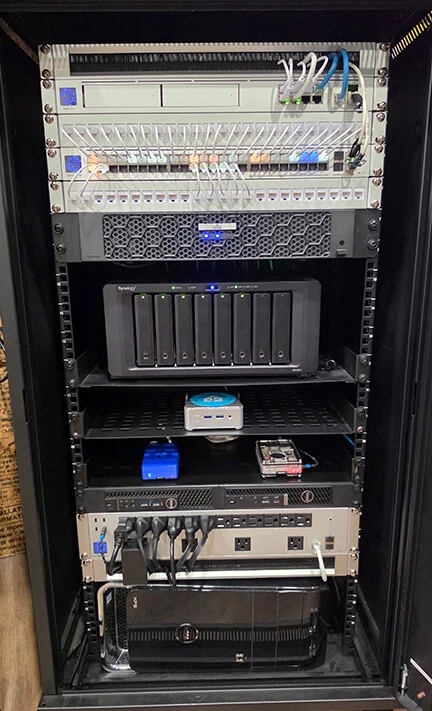
A useful IT support plan starts with understanding what is already in place. We review the network, equipment and dependencies, then agree on the infrastructure we will manage and the changes needed.
Existing infrastructure
We assess the current setup and administration access before taking over management. Useful documentation and a clear support scope make ongoing troubleshooting more practical.
New locations & upgrades
We can plan and configure new infrastructure, including suitable network connections and equipment layouts. Installation and change work are scoped before they begin.
Alerts & response
Monitoring covers the agreed systems. We investigate alerts, work remotely where appropriate and arrange on-site assistance when the issue requires hands-on attention.
BUSINESS TECHNOLOGY · LOCAL SUPPORT
Technology we know.
Support you can reach.
Ubiquiti is a preferred choice for our network infrastructure projects. We also work with Microsoft business environments and Dell equipment, bringing the network, computers and supporting systems into a practical IT management plan.

Ubiquiti · UniFi
Managed gateways, switching and Wi-Fi, with supported site visibility and remote administration. We design new networks and help maintain existing UniFi environments.

Microsoft
Windows business devices and Microsoft 365 environments, with account administration, productivity services and supported security or device-management options.

Dell Technologies
Business computers and server infrastructure selected around your workloads, support requirements and upgrade plans. Existing equipment is assessed before replacement is recommended.
We support a range of business technology. Equipment, software subscriptions and included services are identified in your proposal.
UBIQUITI NETWORK MANAGEMENT
Business networks.
Kept in view.
Your network connects the people, applications and equipment your business relies on. We use Ubiquiti UniFi products extensively for suitable projects, from a small office to larger or multi-location environments.
We plan and manage gateways, switches and wireless access points as one environment. That can include organizing staff and guest connectivity, separating appropriate device groups, reviewing switch capacity and PoE power, and assessing the network path used by phones, cameras and business applications.
Supported UniFi management tools give authorized administrators visibility into connected equipment and site activity. We configure the agreed alerts, review problems and use remote management where appropriate. Internet service, local power, equipment and the selected management arrangement determine which functions remain available during an outage.
Gateways & connectivity
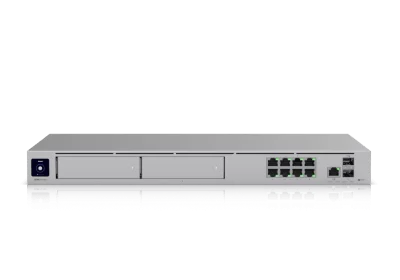
Configure the internet gateway, routing, firewall policies and supported remote-access functions around the business. Where suitable, discuss backup internet and how failover will be tested.
UniFi Dream Machine Pro Max example
Managed switching
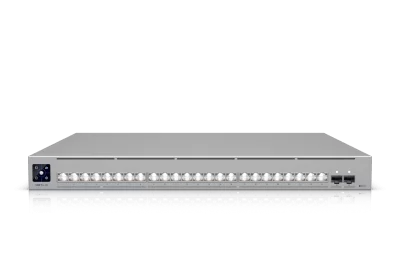
Keep wired devices organized with appropriate switch capacity, port configuration and PoE budgets. We document connections and assess supported network segmentation and uplink requirements.
UniFi Pro XG 24 PoE switch example

Business Wi-Fi
Plan access point placement, coverage, capacity and guest access around the building. Review real-world interference and user experience rather than treating a Wi-Fi signal as proof of reliable service.
UniFi U7 Pro access point example
Need cabling, a rack build or a complete new network? Explore network installation and infrastructure →
COMPUTERS · ACCOUNTS · CLOUD SERVICES
Keep your team
working comfortably.
Managed IT is about the people using the technology as well as the equipment behind it. We help organize supported business devices, user accounts and shared services so everyday changes do not become recurring disruptions.
For Microsoft environments, discuss Windows device setup, Microsoft 365 business email and collaboration tools, account permissions and the way staff access company resources. New starters, departing employees and changing job roles should follow an agreed process.
We review the selected licenses before recommending device management, endpoint protection or other Microsoft security features. These capabilities vary by subscription and supported device; they are not included automatically with every Microsoft 365 plan.

Microsoft business-workplace illustration
Business computers
Set up and support agreed desktops, laptops and peripherals. We can assess Dell and other suitable equipment, plan replacements and coordinate supported manufacturer warranty or repair processes.
Microsoft 365 support
Help administer the agreed email, Teams, OneDrive or SharePoint services your business uses. We review permissions and configuration with you and identify any migration or project work separately.
Accounts & device protection
Plan user onboarding and offboarding, appropriate permissions, multi-factor authentication and supported endpoint protection. Device policies and tools are selected around your environment and service scope.
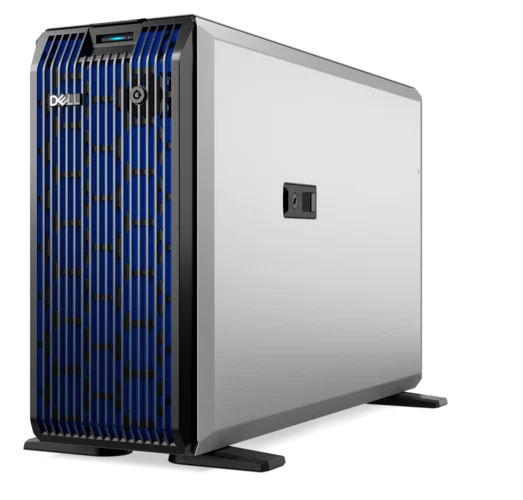
Dell PowerEdge T360 server · equipment example
MAINTENANCE · BACKUPS · RECOVERY
Maintain what runs.
Plan for what could fail.
A useful managed IT service combines ongoing attention with a clear recovery plan. We review the supported servers, storage, network equipment and business dependencies, then agree which checks and maintenance tasks belong in your plan.
Depending on the environment, monitoring can include device availability, storage capacity, supported hardware warnings and the results of configured backup jobs. Our team receives agreed alerts, investigates the issue and responds remotely or in person as appropriate.
We discuss which business data and workloads need protection, where backups should be kept and how restoration will be checked. A successful backup notification is useful; confirming that the required data can be restored is a separate step.
Planned updates & maintenance
Schedule supported operating-system, application and firmware updates around business use. Review dependencies, maintenance windows and recovery options before changes, with responsibilities defined for each system.
Backup management
Assess appropriate local, off-site or cloud backup arrangements for agreed workloads. Define retention, capacity, access permissions and monitoring of job results. Backup software and storage costs are identified in the proposal.
Recovery checks
Agree what should be restored, where and how it will be tested. Restore checks and recovery documentation help expose gaps before an incident; recovery time depends on the system, data volume and available infrastructure.
Cloud file synchronization and built-in version history are not automatically a complete backup strategy. We review the actual recovery requirements for the services and data your business depends on.
AN ONGOING IT RELATIONSHIP
A local team.
A clear support plan.
From maintaining current infrastructure to setting up a new office, LinkedUp Security provides managed IT services and business technology support across the Hudson Valley. The aim is a maintained environment, useful documentation and a practical response when something needs attention.
Monitor & investigate
Agree which devices, services and conditions are monitored, where alerts go and how issues are escalated. We review the available information before choosing the next action.
Remote & on-site support
Resolve supported configuration and software issues remotely where possible. Arrange local site visits when physical equipment, wiring or the problem itself calls for hands-on work.
Document & improve
Maintain useful equipment, network and configuration records, with administrator responsibilities and upcoming changes identified. Review aging equipment and recurring issues when planning improvements.
REAL CUSTOMER FEEDBACK
What our customers say.
EXCELLENTTrustindex verifies that the original source of the review is Google. It was a pleasure working with Linked-Up; the team was professional, knowledgeable, and truly cares about their clients. Highly recommend.Posted onTrustindex verifies that the original source of the review is Google. 5 stars! Very professional, reliable, great customer service, and excellent quality work! I would definitely recommend for all security related work. ⭐️Posted onTrustindex verifies that the original source of the review is Google. Mike has done a lot of work for me. He’s a real professional. He’s really into what he does. His prices are great. He’s always there when you need them.Posted onTrustindex verifies that the original source of the review is Google. Mike is great, knows his stuff, and is sincerely concerned about all your needs. And he is local, my neighbor.Posted onTrustindex verifies that the original source of the review is Google. We're a local business in Putnam, we went the cheap route of Eufy and it was terrible. Mike came by ripped it all out then gave us an amazing complete system. It was a 10/10 experience!Posted onTrustindex verifies that the original source of the review is Google. Mike and his team are extremely knowledgeable, responsive and reasonably priced. We highly recommend them for all of your security installation needs!Posted onTrustindex verifies that the original source of the review is Google. I contracted LinkedUp Security to install security cameras at my house in Peekskill that is on a busy road and am extremely happy that I did! They were professional, on time, communicated great and did outstanding work. They walked me through how to use the new system and answered all questions that I had. I highly recommend Mike and his teamPosted onTrustindex verifies that the original source of the review is Google. Just bought a new house in the area and needed alarms and cameras setup, we called Linked Up Security and couldnt be happier. Mike and his team were super professional and answered any questions me and my wife had. They also walked us through step by step on how to use to new system. Their pricing was the most competitive in the area, highly recommend them to anyone who needs cameras or alarms setup in their house. Thank you Linked Up!Posted onTrustindex verifies that the original source of the review is Google. Mike installed cameras and a new network at our house and I could not be happier with the results. He was thorough, responsive and very communicative, and his work is very clean. Thanks, Mike!Posted onTrustindex verifies that the original source of the review is Google. Mike Ford was recommended to me by another location owner. I reached out to him when I took a new locations and had to clean up a mess of IT nightmares. Weak WiFi, unsecured systems, personal use style devices installed. This is a high profile project with tons of new tech going in. And the key to our success is the backbone of great infrastructure. After meeting with him I could immediately sense he was the company. So I hired him. He came on board and very quickly identified the issues, put together our strategy options and excluded a flawless overhaul. New cable runs, new Wi-Fi, new network, new cameras, and web support. He had it all up and running within an impossible timeline under less then desirable conditions as we were under construction at the same time. For me, being able to trust and rely on an IT pro is key. Someone that is open and shares the details so not as to try and hold us hostage. Rather relies on his quality of work to keep us as clients. He continues to be an asset to our organization to this day. When I find someone that has such a vast knowledge, is responsive, always available, I want to give that person our business. I will definite use him on all future projects. For us, it was a montage of systems. All new IP systems for 140' video wall, self service kicks, two secure networks and a public one, ubiquity drama machine and WiFi, new IP phones, Ip cameras and website development. Of course, all on budget, and all done yesterday. Lol I can confidently recommend his company and team without hesitation.
Clients & organizations
A few of the businesses and local organizations we’ve worked with.


Questions about managed IT
Yes. We assess the equipment, configuration and administration access first. We then explain what can be supported, any changes needed and the scope of an ongoing management agreement.
Yes. We can plan, install and configure new infrastructure as well as manage an existing environment. Tell us about your locations, users, current equipment and the work your systems need to support.
Alerts for the systems included in your plan reach our team. We investigate, use remote access where appropriate and arrange an on-site visit when needed. Alert coverage and response expectations are agreed for your environment.
Yes. We can troubleshoot remotely or respond in person across Westchester, Putnam, Dutchess, Orange and Rockland Counties. The issue, access available and your service agreement determine the next step.
We define the managed equipment and services, monitoring coverage, maintenance responsibilities, support hours and the process for requesting assistance. Equipment purchases and project work are identified separately in the proposal.
Yes. LinkedUp Security also installs cameras, alarms and access control. We can review their infrastructure requirements alongside your business IT and clearly identify the responsibilities and systems included in each project.
Yes. Ubiquiti is a preferred platform for suitable network projects. We can assess and manage supported UniFi gateways, switches and wireless access points, or plan a new deployment. The supported equipment, monitoring, configuration work and ongoing responsibilities are defined for your environment.
We work with Microsoft business environments and Dell equipment alongside Ubiquiti and other suitable technology. We assess existing hardware and software before recommending changes. A managed IT agreement identifies the specific devices and services covered.
Yes, where included in the agreed scope. Support can cover Windows business devices, Microsoft 365 account administration and selected email or collaboration services. Device management and security capabilities depend on licensing and supported equipment; migrations and larger projects are scoped separately.
Yes. We can assess backup requirements for agreed workloads, help configure suitable local, off-site or cloud arrangements, monitor supported job results and plan restore checks. Retention, storage, software costs and recovery expectations are discussed for your environment.
Planned maintenance can include supported operating-system, application and device firmware updates within the agreed scope. We consider dependencies, business hours and recovery options before changes. The proposal identifies which systems are maintained and who is responsible for third-party applications.
No. Monitoring provides information about configured conditions on supported systems. We investigate relevant alerts and take the next step according to your service agreement. Some issues need remote troubleshooting, an on-site visit, replacement equipment or assistance from a software vendor or internet provider.
Yes. We can plan and configure suitable infrastructure for a new location or upgrade an existing environment. Network installation, cabling, rack builds and larger changes are defined as project work, with ongoing management arranged around the installed systems.
Tell us about your IT environment.
Include your business location, approximate number of users or sites, current infrastructure and the issues or changes you want help with. Please leave passwords and other credentials out of your enquiry.