
BUSINESS VoIP & HOSTED PBX
Business VoIP.
Built around your team.
Business VoIP phone service, hosted PBX setup and legacy phone-system replacements throughout the Hudson Valley. LinkedUp Security helps you choose a platform, prepare your network and put the right phones and call handling in place.
New systems · Replacements · Existing-system improvements
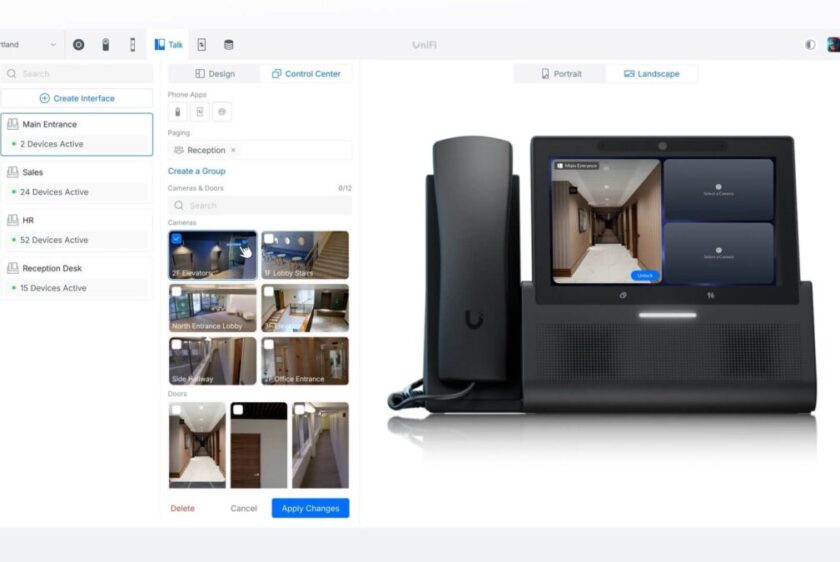
UniFi Talk example. Your platform and equipment are selected for your business.
ONE LOCAL TEAM FOR YOUR PHONE PROJECT
A better way to handle business calls.
Your phone system should reflect how your business actually works: who answers, which departments receive calls, what happens after hours and how staff stay reachable away from their desks. We plan the service and the installation together, from a small office to a business with multiple locations.
Hosted PBX & cloud calling
Replace a traditional phone switch with a provider-hosted business phone system. We help assess subscriptions, extensions, call handling and supported desk-phone, desktop and mobile options.
Legacy phone-system replacement
Move beyond an aging PBX, key system or collection of separate business lines. We review your numbers, equipment, existing cabling and connected devices before designing the replacement.
New offices & growing teams
Set up phones for a new location, add staff or improve an existing deployment. We coordinate users, devices, network connections and the way calls move between people and locations.
PLATFORMS WE WORK WITH
The right fit. Not a one-size-fits-all platform.
We work with services including UniFi Talk, RingCentral, Zoom Phone, Phone.com, Vonage and more. We help you compare the approach, equipment, features and ongoing costs against your actual requirements—or improve a platform you already use.
A locally managed phone-system option within the UniFi ecosystem. We assess the console, supported phones, calling service and site networking as one deployment.
A hosted business communications option for teams that need provider-managed calling and supported office, desktop or mobile workflows. We confirm the plan and device requirements.
Business calling within the Zoom environment. We assess user licensing, supported devices and call handling alongside the way your team already works.
And much more! Options for small and growing businesses, plus other platforms suited to the project. We review numbers, usage, routing and supported equipment before recommending a fit.
Platform names identify services we can help deploy and support. Features, licensing, compatibility and availability vary by provider and plan.
MAKE EVERYDAY CALLS EASIER
Give callers a clear route to the right person.
Greetings & auto attendants
Set up a professional greeting and menu so callers can reach the right team without relying on one person to answer every call.
Extensions & ring groups
Plan individual extensions, shared ringing and transfers around reception, departments and the people who need to answer.
Business-hours routing
Define opening hours, holidays and after-hours handling. Decide when calls should ring, go to voicemail or follow another approved route.
Voicemail & notifications
Set up personal or shared mailboxes and supported notifications. Confirm how messages are accessed and who is responsible for responding.
Desk phones & apps
Choose supported handsets, headsets and desktop or mobile apps for each role. A reception desk and a mobile employee may need different tools.
Queues & advanced options
Discuss call queues, reporting, recording, messaging and integrations where supported. We confirm licensing and configuration before including them in your system.
These are planning options, not a promise that every feature is included with every platform. Any recording, messaging or integration requirements are reviewed for your selected service.
DESIGNED AROUND YOUR WORKDAY
What should happen when a customer calls?
We turn your answering process into a practical call flow. Start with your main number, then decide who should ring, what callers hear and where unanswered calls go.
Explore this simple example. Your system can be planned around reception, departments, multiple sites and approved out-of-office arrangements.
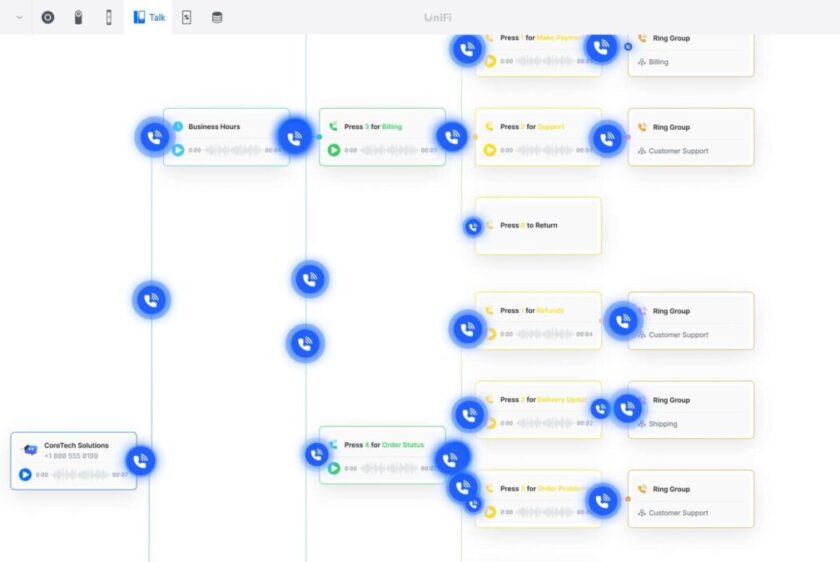
Example UniFi Talk call-routing interface.
REPLACE THE SYSTEM. PLAN THE TRANSITION.
Keep the details that matter to your business.
A phone-system replacement involves more than swapping handsets. We inventory your main number, direct numbers, extensions, voicemail boxes, menus and any devices using a telephone line. That becomes the starting point for your new configuration.
We coordinate number-porting preparation with the selected provider and plan testing around your operating hours. Number eligibility and completion dates depend on the carriers involved. Existing service stays in place until the agreed transition and porting steps are complete.
Assess & design
Review current service, users, numbers, devices and call handling. Identify cabling, network and platform requirements before ordering.
Configure & transition
Prepare users, phones, greetings and routing. Coordinate the provider’s porting process and an agreed changeover plan.
Test & hand over
Check incoming and outgoing calls, caller ID, transfers, voicemail and key call paths. Show your staff how to use and manage the agreed setup.
THE NETWORK BEHIND THE CALL
Good phone service starts below the handset.
Call quality depends on more than internet speed. We assess network cabling, switches, Power over Ethernet, router configuration and the connection available to each phone. Where the project needs it, we can install wiring, organize the rack and configure the network alongside the phone system.
We also discuss backup power, an alternate internet connection and supported call-forwarding arrangements. Phones, network equipment and the service provider can all affect availability; the continuity plan should cover the full path.
Fax machines, door-entry equipment, alarms and other devices using analog lines are assessed separately. Reuse or an adapter is considered only after compatibility and operating requirements are checked.
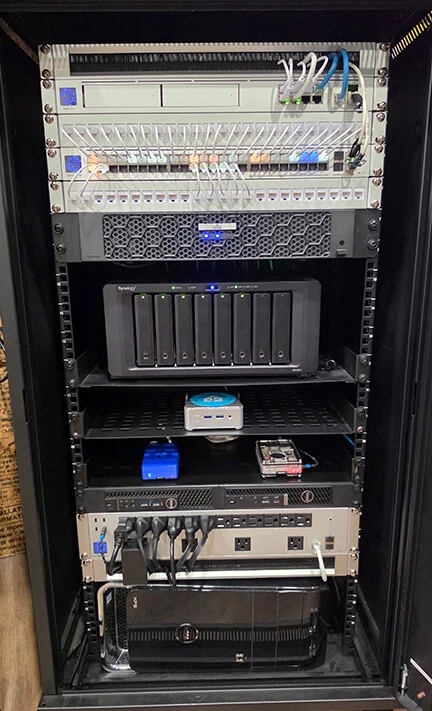
Network infrastructure work by LinkedUp Security.
BUSINESS PHONE SYSTEMS IN THE HUDSON VALLEY
Local installation. A system that can grow with you.
We help businesses across Westchester, Putnam, Dutchess, Orange and Rockland counties plan and deploy VoIP phone systems. From a new office in White Plains or Carmel to a replacement system in Poughkeepsie, Newburgh or New City, the starting point is your users, location and call-handling needs.
Tell us about additional locations or remote staff so we can assess the full scope. Initial setup, subscriptions and any ongoing administration or support are defined in your proposal.
CUSTOMER FEEDBACK
Technology work. Local relationships.
EXCELLENTTrustindex verifies that the original source of the review is Google. 5 stars! Very professional, reliable, great customer service, and excellent quality work! I would definitely recommend for all security related work. ⭐️Posted onTrustindex verifies that the original source of the review is Google. Mike has done a lot of work for me. He’s a real professional. He’s really into what he does. His prices are great. He’s always there when you need them.Posted onTrustindex verifies that the original source of the review is Google. Mike is great, knows his stuff, and is sincerely concerned about all your needs. And he is local, my neighbor.Posted onTrustindex verifies that the original source of the review is Google. We're a local business in Putnam, we went the cheap route of Eufy and it was terrible. Mike came by ripped it all out then gave us an amazing complete system. It was a 10/10 experience!Posted onTrustindex verifies that the original source of the review is Google. Mike and his team are extremely knowledgeable, responsive and reasonably priced. We highly recommend them for all of your security installation needs!Posted onTrustindex verifies that the original source of the review is Google. I contracted LinkedUp Security to install security cameras at my house in Peekskill that is on a busy road and am extremely happy that I did! They were professional, on time, communicated great and did outstanding work. They walked me through how to use the new system and answered all questions that I had. I highly recommend Mike and his teamPosted onTrustindex verifies that the original source of the review is Google. Just bought a new house in the area and needed alarms and cameras setup, we called Linked Up Security and couldnt be happier. Mike and his team were super professional and answered any questions me and my wife had. They also walked us through step by step on how to use to new system. Their pricing was the most competitive in the area, highly recommend them to anyone who needs cameras or alarms setup in their house. Thank you Linked Up!Posted onTrustindex verifies that the original source of the review is Google. Mike installed cameras and a new network at our house and I could not be happier with the results. He was thorough, responsive and very communicative, and his work is very clean. Thanks, Mike!Posted onTrustindex verifies that the original source of the review is Google. Mike Ford was recommended to me by another location owner. I reached out to him when I took a new locations and had to clean up a mess of IT nightmares. Weak WiFi, unsecured systems, personal use style devices installed. This is a high profile project with tons of new tech going in. And the key to our success is the backbone of great infrastructure. After meeting with him I could immediately sense he was the company. So I hired him. He came on board and very quickly identified the issues, put together our strategy options and excluded a flawless overhaul. New cable runs, new Wi-Fi, new network, new cameras, and web support. He had it all up and running within an impossible timeline under less then desirable conditions as we were under construction at the same time. For me, being able to trust and rely on an IT pro is key. Someone that is open and shares the details so not as to try and hold us hostage. Rather relies on his quality of work to keep us as clients. He continues to be an asset to our organization to this day. When I find someone that has such a vast knowledge, is responsive, always available, I want to give that person our business. I will definite use him on all future projects. For us, it was a montage of systems. All new IP systems for 140' video wall, self service kicks, two secure networks and a public one, ubiquity drama machine and WiFi, new IP phones, Ip cameras and website development. Of course, all on budget, and all done yesterday. Lol I can confidently recommend his company and team without hesitation.Posted onTrustindex verifies that the original source of the review is Google. I hired LinkedUp Security to install multiple cameras at my home about 5 years ago and they have been perfect since. I've communicated with Mike with questions multiple times since the install and he is always very responsive and helpful. Highly recommend!
Questions about business VoIP & hosted PBX
VoIP carries phone calls over an internet connection rather than relying only on traditional telephone lines. A business VoIP deployment combines calling service, users, phones or apps, and features such as extensions, routing and voicemail. LinkedUp Security helps plan, install and configure that setup.
PBX stands for Private Branch Exchange: a business phone system that manages extensions and routes calls. A hosted PBX provides those functions from a service provider’s infrastructure instead of a traditional phone switch at your premises. Your users connect through supported phones or apps. Locally managed options such as UniFi Talk use a different deployment approach, which we assess alongside hosted services.
We work with platforms including UniFi Talk, RingCentral, Zoom Phone, Phone.com and other business phone services. We can help assess a new system or improve an existing deployment. The proposal confirms the platform, supported equipment, licenses and scope of work.
Yes. We review the existing PBX or key system, numbers, handsets, cabling and call-handling requirements, then plan a suitable replacement. Connected analog devices are checked separately, and existing equipment is reused only where its condition and compatibility make that practical.
Often, an existing number can be transferred to the new provider. Portability, required account details and completion dates must be confirmed with the carriers. We coordinate the preparation and transition plan; do not cancel the existing number or service before the porting requirements are confirmed and completed.
Yes, when supported by the chosen platform, plan and devices. We assess which roles need a desk phone, headset or app, and configure the agreed user setup. App availability and remote-working arrangements differ between services.
Yes. We plan greetings, extensions, ring groups, voicemail and business-hours routing around your team. Queues, recording, reporting and other advanced functions are included where supported and specified in the selected service.
VoIP depends on power, connectivity and the service platform. Backup power, a secondary connection and supported forwarding can be considered, but they do not guarantee uninterrupted calling. We review the appropriate continuity arrangements and the provider’s emergency-calling setup, including location details for office and remote users.
Cost depends on the platform, number of users and numbers, handsets, installation work, calling requirements and selected features. We separate equipment and setup from recurring service charges so you can compare the full scope. Savings over an existing service are assessed rather than assumed.
Yes. We can include cabling, switching, Power over Ethernet and network configuration with the phone project. Ongoing user changes, routing updates and remote or on-site assistance are available within an agreed support scope. Contact us with your locations, current platform and the work you need.
LET’S TALK ABOUT YOUR PHONE SYSTEM
Make your next business call a better one.
Tell us your business location, approximate number of users, current phone system and whether you need a new installation or a replacement. Include any requirements for numbers, menus, remote staff or multiple locations.
Call (914) 246-CCTV or send an enquiry below.